
How Can I Get a DUPR Rating in Pickleball?
How Can I Get A DUPR Rating in Pickleball?
How Can I Get a DUPR Rating in Pickleball?
How Can I Get A DUPR Rating in Pickleball?
2. Bypass the DUPR Subscription and Go to Your DUPR Dashboard
4. If You're Competing In Our Competitions, Do This
More and more people are getting their DUPR as Pickleball grows in the Illawarra region.
To get a DUPR rating in Pickleball, follow these steps:
1. Sign Up At DUPR
Go to www.dupr.com and create a profile.

You will then be asked to enter the following informa

2. Bypass the DUPR Subscription and Go to Your DUPR Dashboard
You will then be asked to purchase a DUPR subscription:

You can actually skip getting a subscription by following this link to the DUPR Dashboard.
Note that you will need to verify your email address to be able to use your account.
3. Take Note of Your DUPR ID
Your DUPR ID can be found by clicking on "Home" in the left column. You will then see your DUPR ID next to the "Share" button underneath your profile icon:

You will use this DUPR ID for registration in tournaments at Official Pickleball Tournaments.
4. If You're Competing In Our Competitions, Do This
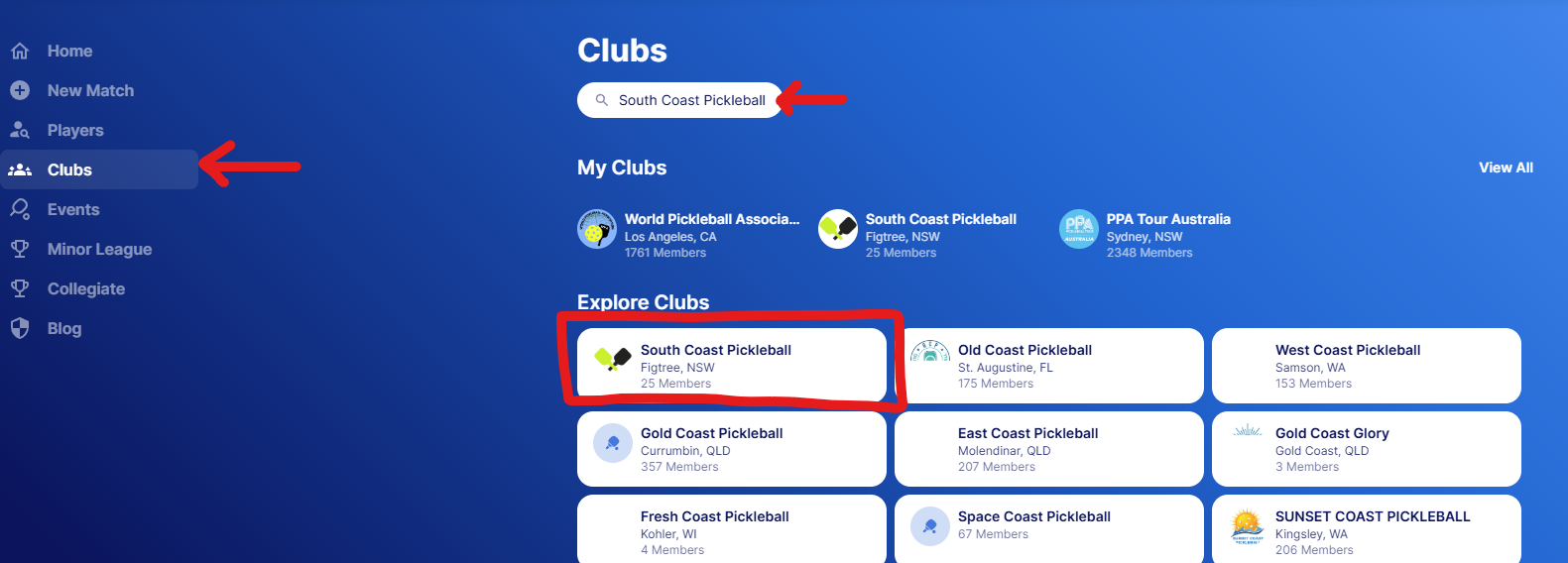
Go to Clubs, then search "South Coast Pickleball" and then click on the club that shows up with our logo, as shown below:
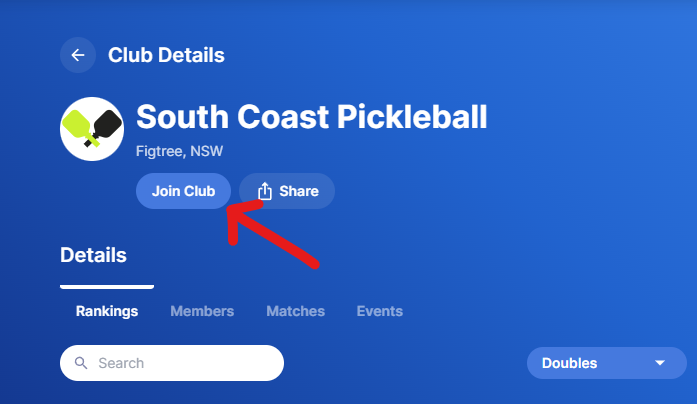
Then, join our club, as shown below.
Note that you can join multiple clubs - doing so only allows that club admin to enter DUPR matches on your behalf. So, if you're competing in their tournaments, it makes DUPR entry easy for the tournament organisers.
Once you do this, we'll automatically enter your completed matches into DUPR every week as you compete in our competitions and tournaments.
At the same time, you can also log your own matches. For example, if you wanted to have a DUPR match against someone, you can log that yourself - see below.
5. How to Submit Your Own Matches to DUPR
You can then submit matches to DUPR as required. First, click "New match" ion the left menu bar:

Then, enter your match details and participants (you can also enter singles matches):

NR means you are not rated. A rating will be automatically generated after you play one game. As you play more games, ratings will become more accurate.
How Does South Coast Pickleball Use Your DUPR?
If you're competing in our Weekly Competitions, your scores will be uploaded to DUPR every week, and you can review this on your DUPR Profile every week. This will be separate from the division ladders you can find on our website, which is used for internal scoring and division setting.
And that's exactly how to get your DUPR and start logging DUPR Matches for Pickleball!

